Uptime In Windows
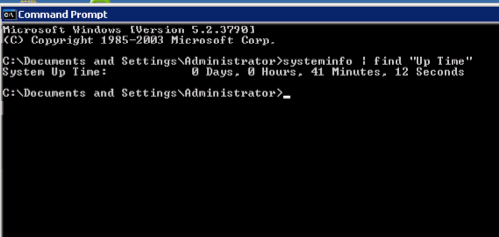
One of the many things that has annoyed me about Windows is the lack of an "uptime" utility like UNIX or Linux machines. There are a lot of scenarios where I need to find out quickly the last time the system had been rebooting without having to grep through logs.. err.. scroll through the Event Viewer. One trick that I picked up recently was that the systeminfo utility will tell you the uptime and you can parse out all the extra junk. I know this tip works on Windows 2003 Server and Windows XP, but I don't have access to a lot of other Windows platforms (and didn't bother checking earlier ones). You can simply run from a command prompt: systeminfo | find "Up Time".
Comments
Comments powered by Disqus